ZangaBox: View and Edit Integrator.io Objects in JSON
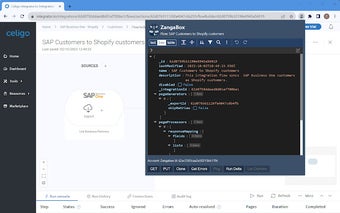
ZangaBox is a free Chrome add-on developed by ZangaBee B.V. that allows users to view and edit Integrator.io objects directly in JSON format. With ZangaBox, users can gain insight into the inner workings of the Celigo Integrator.io platform, make copies and backups, and make changes according to their preferences.
One of the key features of ZangaBox is its ability to display the JSON representation of the current Integrator.io page or object. Users can copy this representation to their version control system or compare it with another flow. It also enables users to directly edit the JSON object and save it back to Celigo using a PUT operation.
In addition, ZangaBox allows users to copy the JSON of the object to the clipboard for use in a My API or script, and clone any Celigo object. It can also list errors in a flow, export, or import, and run a ping command on a Celigo connection to check its functionality.
To use ZangaBox, simply click on the icon in the menu bar when on a Celigo page. The extension works on both US and EU domains and utilizes users' Celigo session details as credentials. All requests made by ZangaBox go directly and solely to integrator.io, ensuring the security and privacy of user data.
ZangaBee is an integration specialist with customers in the EU and North America. They develop integrations using the Celigo Integrator.io platform and aim to provide intelligent integration solutions to their customers. Users are encouraged to share their suggestions for ZangaBox's evolution by emailing